

Your campaign is live, clicks are arriving, and the app is recording purchases—but the ad platform still reports zero or implausible conversions. This is the failure an ads integration must prevent. The work is not finished when an SDK builds successfully; it is finished when one test user can travel from ad click to the intended app screen and return one correctly attributed conversion.
Ads integration connects a mobile app, its measurement layer, and advertising partners so installs and in-app events can be attributed and used for reporting or optimization. A reliable setup defines events first, preserves campaign context through the store, maps each partner, respects platform privacy rules, and validates the full journey on real devices before launch.
This guide focuses on apps being promoted through paid media. If your goal is to display an in-app ad and earn publisher revenue, you need an ad-serving or mediation SDK as well; that is a separate integration with different testing and UX requirements.
What ads integration means for a mobile app
“Ads integration” is used for three related jobs:
| Job | What is connected | Primary outcome |
|---|---|---|
| Acquisition measurement | App, mobile measurement partner (MMP), and ad networks | Attribute installs and post-install events |
| Campaign routing | Ad link, app store, and in-app destination | Send users to the promised screen, including after install |
| Ad monetization | Publisher app, ad-serving SDK, and demand partners | Display ads and measure impressions or revenue |
This distinction matters. An ad tag can identify a campaign or placement, but it cannot compensate for a missing first-open event or purchase callback. An ads PMP, or private marketplace deal, controls how inventory is bought; it does not replace the app-side attribution path.
For acquisition, the useful data path is:
ad engagement → campaign link → app store or app → first open → in-app event → attribution decision → partner postback
An MMP centralizes this path across networks: it collects the engagement and install signals each network can provide, matches eligible activity against a single set of rules, and reports what users do after install. That last part is what a network's own dashboard cannot do impartially, because every network sees only its own contribution. Our guide to mobile measurement partners covers what that layer owns and where its limits are.
Choose the right ads integration architecture
Pick an architecture based on channel count, event trust, and who will own maintenance.
| Architecture | Best fit | Main risk |
|---|---|---|
| Separate network SDKs | One or two channels with a clear platform requirement | Duplicate event logic, larger app footprint, fragmented reporting |
| MMP SDK plus partner connectors | Teams buying across several ad networks | Misconfigured mappings or postbacks can look like an SDK failure |
| Hybrid SDK and server-to-server (S2S) | Apps that need install context on-device and validated revenue from the backend | Duplicate conversions unless both paths share stable IDs and ownership |
Partner connectors are not self-configuring. Depending on the network, they may share installs, sessions, mapped events, revenue, or reattribution data. The Adjust ad-network integration documentation recommends testing callbacks with a live link and app before campaigns go live.
Deeplinkly gives app teams one developer-first layer for deep links, deferred routing, and install attribution across campaigns. Use it when you want consistent links and events without maintaining a separate routing implementation for each partner; each ad network's account permissions, event mapping, and privacy settings still need to be configured.
Plan your ads integration before writing code
Start with a conversion contract. For every event, record its business meaning, source of truth, trigger, required fields, unique ID, and partner destinations.
| Event | Recommended source | Deduplication key | Important fields |
|---|---|---|---|
| First open | Mobile SDK | App install/session identifier | Platform, app version, consent state |
| Sign-up complete | App or backend after success | User or event ID | Timestamp, campaign context |
| Purchase | Backend after payment confirmation | Order or transaction ID | Value, currency, product, timestamp |
| Subscription renewal | Billing backend | Invoice or renewal ID | Value, currency, plan, renewal state |
Use the same event meaning on iOS, Android, the MMP, and every ad partner. Decide whether a button tap or confirmed backend outcome counts; sending both under one name creates inflated totals. Define attribution windows and time zones before comparing dashboards.
Keep the first release small: first open, one activation event, and the deepest reliable revenue event. Additional events are easier to add after the core path is observable.
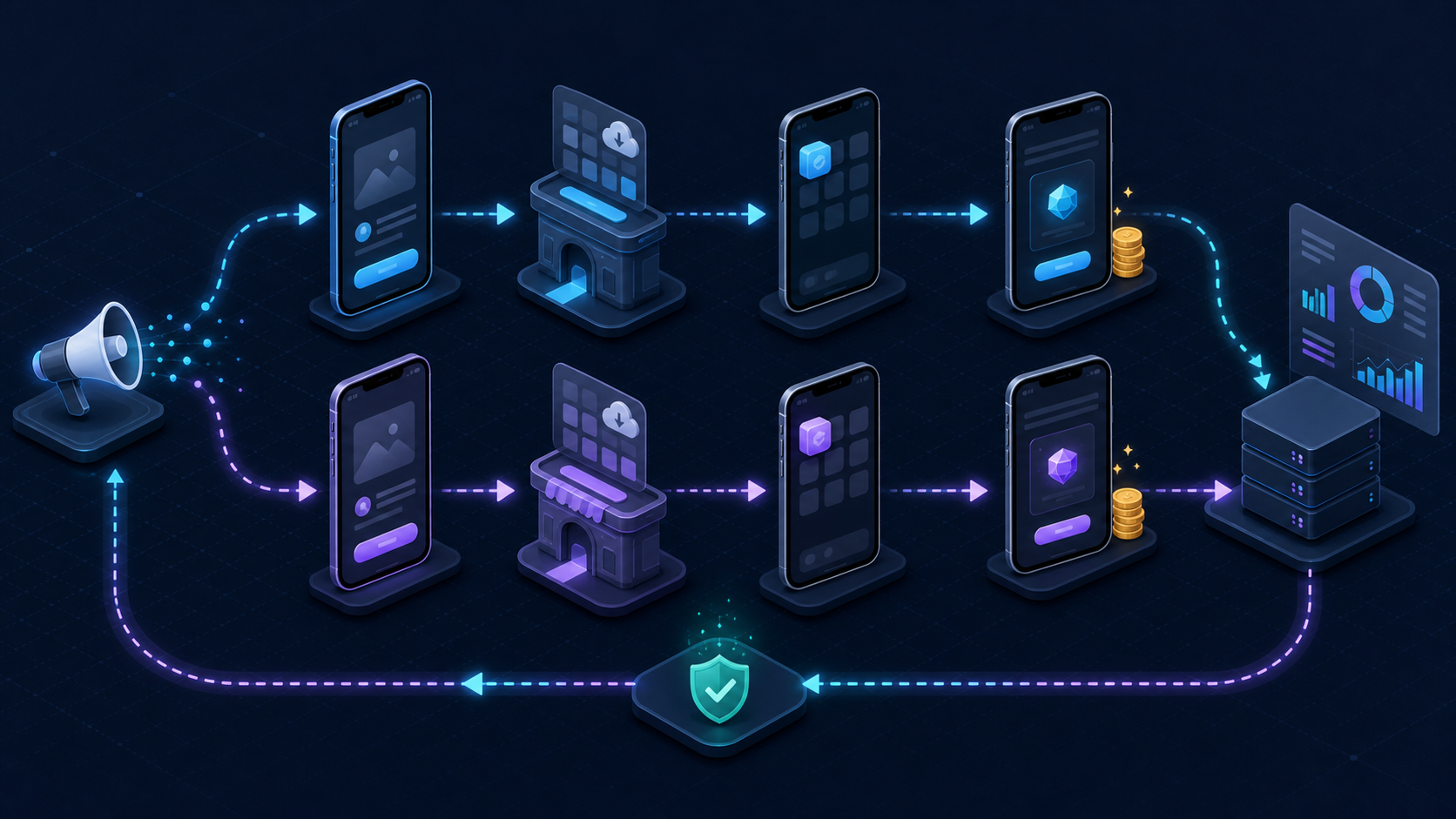
How to set up ads integration end to end
1. Instrument the app and initialize once
Add the chosen measurement SDK using its supported package manager and initialize it at the documented app-lifecycle point. Avoid multiple initialization paths. Enable debug logging only in non-production builds, and record the SDK version alongside each release so regressions can be traced.
If you use Firebase for Google Ads measurement, Google says app conversions can be imported from Firebase, Google Play, or a third-party app analytics provider. Its mobile app conversion setup guide also calls for current APIs or SDKs so consent signals are communicated correctly.
2. Connect each ad partner and map events
Link the exact iOS and Android app records to the correct advertising account. Enable only the events needed for campaign reporting and optimization, then map your canonical names to the partner's accepted names.
Treat access and data-sharing settings as part of the integration. Document who can change them. Google’s App Conversion Tracking and Remarketing API uses a link ID to bind one app on one platform to the provider integration and includes a cross-network confirmation flow for deduplication.
3. Preserve Android install context
On Android, retrieve store referral data on the first eligible launch. The official Google Play Install Referrer documentation says the API can return the referrer URL plus click and install timestamps; Kotlin and Java apps can use the client library.
Read the value once according to the library guidance, pass it to the measurement layer, and retain diagnostic status—not raw identifiers indefinitely. Test a Play Store path rather than relying only on local installation, which skips the store handoff.
4. Implement iOS privacy-safe measurement
Separate permissioned cross-app tracking from Apple’s privacy-preserving attribution. Apple requires App Tracking Transparency when an app collects end-user data and shares it with other companies for tracking across apps or websites. The App Tracking Transparency documentation covers the usage description, authorization request, and status check.
Apple also states that apps can call AdAttributionKit regardless of tracking authorization status. Test authorized, denied, restricted, and not-determined states; a denial should lead to the supported privacy-safe path, not a crash or a workaround that recreates identity.
5. Build the ad destination and fallback
Use a deep link for users who already have the app and a deferred route for users who install first. Preserve only the parameters needed to identify the campaign and render the destination. Validate incoming values, and define fallbacks for logged-out users, unavailable content, old app versions, and desktop clicks.
Google notes that app engagement ads rely on deep links and provides an App URI test in the campaign workflow. You should also test candidate destinations independently with the deep-link debugger.
6. Configure callbacks and deduplication
For each partner, decide which installs, re-engagements, events, revenue fields, and consent signals may be sent. Use a unique transaction ID for revenue. If the app SDK and backend can both report a purchase, make one authoritative or ensure both paths share the same deduplication key.
Log callback request time, response status, retry count, and partner error category without exposing unnecessary personal data. That turns “the network is missing events” into a traceable handoff.
Test ads integration before campaign launch
Run the integration on physical iOS and Android devices with production-like links and test accounts.
| Test | Expected evidence |
|---|---|
| Installed-app click | Correct screen opens; one click and open are recorded |
| Fresh install | Store opens; campaign context survives to first open |
| Consent denied | App remains usable; privacy-safe measurement path is visible |
| Conversion success | One mapped event arrives with correct value and currency |
| Retry or duplicate tap | Only one conversion is eligible |
| Invalid destination | Safe fallback opens and logs a diagnosable reason |
Check four places: device logs, the MMP's live event view, the ad partner's diagnostics, and your backend ledger. Use a unique test ID to follow one journey. Aggregate totals can differ because of processing time, windows, time zones, privacy thresholds, rejection rules, and deduplication.
Troubleshoot in order. If the app never emits the event, fix instrumentation. If the MMP receives it but the partner does not, inspect enablement, mapping, eligibility, and callback responses. If the partner receives it under the wrong campaign, inspect the click link, app record, and attribution window.
Measure integration quality after launch
An ads integration is healthy when it is accurate, observable, and useful for decisions—not merely when dashboards contain data. Monitor click-to-install rate, activation rate, cost per activated user, purchase rate, revenue or ROAS, unattributed share, callback failure rate, and event latency by platform and app version.
Create alerts for a sudden fall in first opens, a spike in organic attribution after an app release, missing revenue fields, or a partner callback failure. Re-run the device matrix when an SDK, consent flow, billing path, deep-link handler, or partner setting changes.
Frequently asked questions
What is ads integration in a mobile app?
For app acquisition, ads integration connects campaign links, the app, a measurement provider, and advertising platforms so installs and post-install events can be attributed and returned for reporting or optimization. For monetization, the same phrase can instead mean adding an ad-serving SDK to display in-app ads.
Do I need a separate SDK for every ad network?
Not always. An MMP can connect one app-side measurement SDK to multiple supported networks, although some partners or monetization products still require their own SDK. Confirm requirements for your exact campaign and avoid duplicate event emitters.
What events should an ads integration track?
Start with first open, one activation milestone, and the deepest reliable conversion such as a confirmed purchase or paid renewal. Give each event one definition, one source of truth, and a stable deduplication key.
How do I test mobile ad attribution?
Use a real campaign or partner test link on physical devices. Verify installed and fresh-install paths, each consent state, the destination, event payload, MMP record, partner receipt, and duplicate handling with one traceable test ID.
Why do the MMP and ad network show different conversions?
Common causes are processing latency, time zones, attribution windows, event mapping, consent restrictions, rejected events, currency rules, and duplicate handling. Reconcile a single test or transaction ID before comparing daily totals.
Conclusion: launch only when one conversion is explainable
The safest ads integration is not the one with the most SDKs. It is the smallest architecture that preserves campaign context, emits trustworthy events, respects platform privacy, routes users correctly, and exposes every handoff for testing.
Before increasing spend, run one click-to-conversion journey on both platforms and make every system explain the same result. If your team needs one layer for deferred routing and cross-channel attribution, evaluate the platform against your partner list and event contract, then launch with the QA matrix above as the release gate.